The Motherboard That Forgot Its Settings: A Winter CMOS Check for UK Gaming PCs
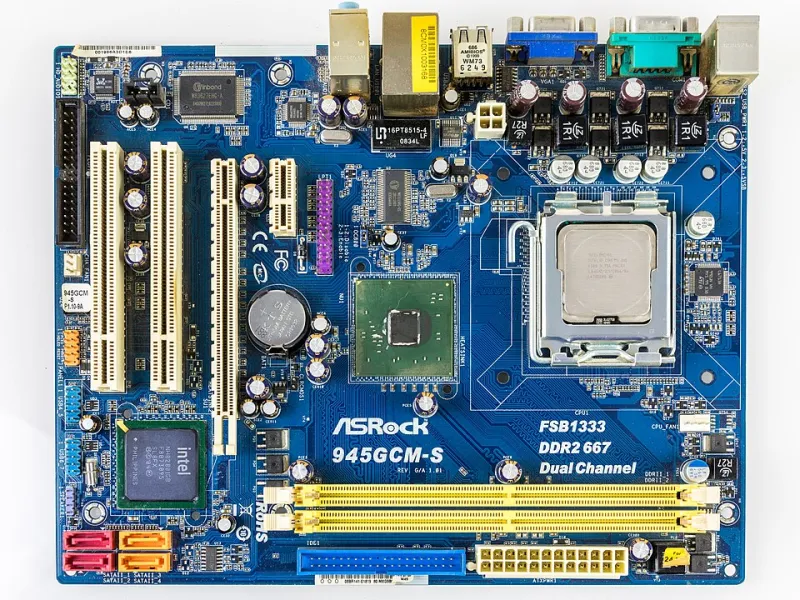
Photo: Raimond Spekking, CC BY-SA 4.0, via Wikimedia Commons
There is a particular kind of bad morning for an older gaming PC. You press the power button, the fans spin up, and instead of Windows you get a black screen with CMOS checksum error or Press F1 to continue. The clock is wrong by years. Your memory is running at default speed, your carefully tuned CPU undervolt has vanished, and the boot order has decided that an old USB stick is the most important drive in the machine.
In a warm, stable room this can happen once and never again. In a British spare bedroom, loft conversion or converted garage, it tends to arrive with the first proper cold snap. The usual suspect is not dramatic: it is a CR2032 coin cell that has been quietly losing its grip for months.
What the coin cell actually does
The CMOS battery is a small 3V lithium cell on the motherboard. It keeps the real-time clock ticking and preserves the tiny memory area that stores basic configuration when the PC is fully disconnected from the mains. On plenty of older and budget boards, that includes date and time, boot order, fan settings and sometimes memory profiles. Modern boards are better at holding settings in non-volatile storage, but the battery still matters, and a marginal cell can produce exactly the sort of inconsistent behaviour that makes you blame Windows, RAM or the phase of the moon.
The key detail is that the battery is not there to run the PC. It is there to remember things while the PC is off. If your machine only forgets itself when you switch off at the wall or unplug it for a few days, the coin cell is firmly in the frame. If it resets while the PSU is still plugged in and the standby light is on, the board may be losing power on the CMOS circuit for another reason.
Why winter makes it obvious
A CR2032 is a chemical device, and cold slows it down. A cell that measures fine at 18°C in a centrally heated room can sag when the spare room drops to single figures overnight. Add the temperature swing of a loft or a room above a garage, and a battery that was already past its best starts failing the only test that matters: holding voltage while the system is unplugged.
This is not really a condensation story, although damp rooms are never helpful. It is a voltage-margin story. The cell is old, the cold lowers its output, and the board decides the battery is not trustworthy. You get a clock reset, a checksum error, full-speed fans because the fan curve has gone, and memory running at 2133MHz when you paid for 3600. If your undervolt lives in the BIOS, whether that is a CPU voltage offset or a curve optimiser setting, it can disappear too. GPU undervolts applied in Windows software are a different matter, but BIOS-level tuning is fair game for a CMOS reset.
The five-minute multimeter test
You do not need a lab. A basic digital multimeter is enough, and most PC builders should own one anyway.
- Shut the PC down and switch off the PSU. Unplug the kettle lead from the back. Hold the power button for five seconds to drain the standby power.
- Take the side panel off and locate the coin cell. It is usually a shiny CR2032 in a spring clip, sometimes under the graphics card.
- Press the retaining clip gently and lift the battery out. Do not lever it with a screwdriver if you can avoid it; a plastic spudger or your fingernail is kinder to the socket.
- Set the multimeter to DC volts, usually the 20V range. Touch the red probe to the positive face and the black probe to the bare metal edge. A fresh cell should read around 3.2V to 3.3V open-circuit.
- A reading of 2.9V is not automatically dead, but it is tired. Below about 2.8V, replace it. If the voltage collapses when the cell is under any load, replace it even if the open-circuit number looks respectable.
Do not test a coin cell by touching it to your tongue. It is not clever, it is not accurate, and it is a good way to make an ordinary maintenance job weird.
Replacing it without creating a second job
Buy a branded CR2032 from a supermarket, electronics shop or reputable online seller. Counterfeit cells exist, and a no-name battery that reads 3.0V in the packet may not last the winter. A CR2032 is not rechargeable, so do not put it on a charger or try to revive it.
Fit the new cell with the positive face upwards, matching the marking on the socket. The clip should click without force. While you are in there, check for white or green corrosion around the socket and give the area a gentle look with a torch. If the old battery has leaked, clean-up is a job for isopropyl alcohol and a lot of care, not a wet cotton bud and optimism.
Then start the PC, press Del or F2 to enter the BIOS, and set the date and time. Re-enable XMP or EXPO, check the boot order, restore your fan curve and re-enter any CPU undervolt or voltage offset. Save and exit. If the board offers profiles, save the working setup to a BIOS profile so the next reset is a two-minute fix rather than a twenty-minute memory test.
Dead battery or dying board?
A new cell should last several years. If a fresh, known-good CR2032 is flat again within weeks, stop buying batteries and start looking at the board. Common culprits include a dirty or damaged battery socket, a leaky nearby component, a stuck CMOS clear jumper, or a fault in the real-time clock circuit. A board that resets even with a good battery and the PSU plugged in may have a deeper standby power problem. Random shutdowns, boot loops and memory errors are usually not CMOS battery symptoms at all; they point towards RAM, PSU or board stability.
For most UK gamers, though, the fix is pleasantly dull. Keep a spare CR2032 in the drawer, write the fit date on it with a marker, and check the battery before you spend an evening reseating RAM because the clock is wrong. It is one of the cheapest bits in the build, and in a cold spare room it earns its keep.