£250, Spent Properly: The Upgrade Order That Makes an Old Gaming PC Feel New Again
There's a particular kind of frustration that sets in around year three of owning a gaming PC. Nothing is broken. Benchmarks still land roughly where they always did. And yet the machine feels tired — Windows takes an age to settle after login, textures pop in during the first minute of a match, and the whole thing seems to breathe heavily the moment the ambient temperature creeps past 22°C.
The instinct is to start pricing up a whole new build. Resist it. Most of the time, a few hundred quid aimed at the right component gets you 80% of the way to "new PC" in the ways you actually notice. Here's the order we'd spend it in, as of late 2026, using prices you'll genuinely find at Scan, Overclockers UK, CeX and eBay.
Before you buy anything, find the actual bottleneck
Spend twenty minutes with Task Manager, HWiNFO and a couple of your regular games. If the GPU is pinned at 99% while the CPU idles at 40%, you're graphics-limited and a CPU upgrade is money wasted. If it's the reverse — GPU coasting, one or two CPU threads maxed — you're platform-limited. If neither is true but everything still feels sticky, the problem is almost always storage or thermals, not horsepower.
Write the answer down. It decides everything below.
Step one: storage, because it's the cheapest fix to the most common complaint
A 1TB Gen4 NVMe drive is now about £55–£65 at Scan or Overclockers — a WD SN770 or Crucial P3 Plus class of thing. Two terabytes sits around £95–£110. If your boot drive is a SATA SSD from 2020, or worse, a hard drive you never got round to replacing, this is the single best value upgrade on the list. It won't add frames, but it will kill the login lag, the stutter when a game streams in assets, and the general sense that the machine is thinking about it.
Clone your existing drive first, keep the old one as a game library, and you've spent £60 on making a four-year-old PC feel responsive again.
Step two: decide whether your platform deserves one more CPU
This is where the £250 gets interesting, and where most people get it wrong by upgrading the GPU when they should be upgrading the socket — or vice versa.
If you're on AM4 with a Ryzen 1000 or 2000 series
A Ryzen 5 5600 is roughly £90–£100 new, and £65–£75 on eBay. It's a drop-in upgrade on most B450 and B550 boards after a BIOS flash, and it's transformative. If you've got a bit more room, a 5700X3D at around £150–£180 is the farewell tour for AM4 and still handles modern titles comfortably. Do this before you touch the graphics card.
If you're on AM4 with a Ryzen 3000 or 5000
You already have enough CPU. Skip to step three and put the whole budget into graphics.
If you're on LGA1700 (12th–14th gen Intel)
You're fine. An i5-12400F or better still pulls its weight in 2026. Don't buy another CPU for this socket; there's no meaningful upgrade left that justifies the spend.
If you're on LGA1151, AM4 with a 4-core, or anything older than 2019
Don't sink money into this platform. Buy storage now, buy a GPU you can carry forward to a new build later, and start a separate savings pot. A 5600-or-better platform with a B550 board and 16GB of DDR4 is about £220–£250 second-hand — worth doing eventually, but it's a different conversation to a £250 refresh.
Step three: the graphics card, sized to your monitor
Here's where the biggest visual jump lives. At 1080p a used RTX 3060 Ti from CeX runs about £180–£200 with a two-year warranty, and an RX 6700 XT is roughly £200–£220. On eBay expect £20–£30 less, with rather less comeback if it's a dud. At 1440p, a used 4070 or RX 7800 XT is more like £330–£380, which blows the budget — so be honest about your resolution before you start shopping.
A new RTX 4060 at around £230–£250 is a safe, low-power pick if you'd rather not gamble on second-hand silicon, though it's a smaller step up than the used market offers.
One warning: if your power supply is a no-name 500W unit from the original build, deal with that first. A £60 650W Bronze unit from a real brand is boring, invisible, and the difference between a stable machine and an intermittent one.
Step four: cooling and airflow, the cheap multiplier
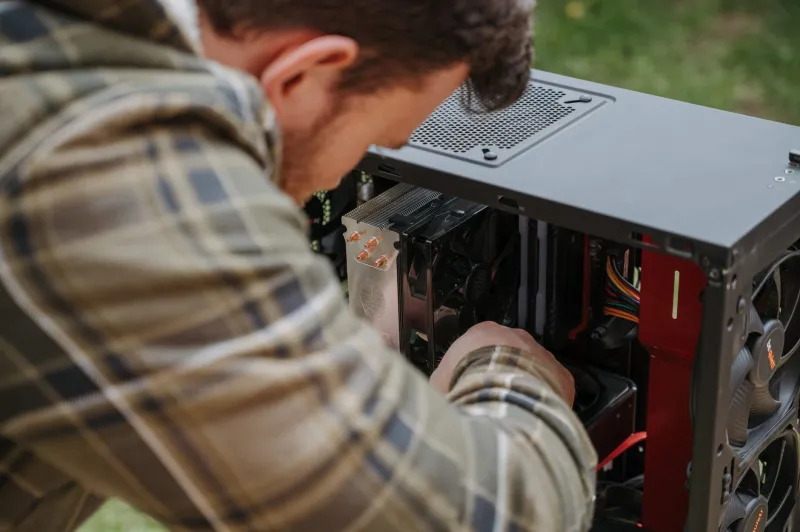
A Thermalright Peerless Assassin is about £35 and will outperform most 240mm AIOs from five years ago. Three Arctic P12 fans are £21. If your case has a solid front panel and one exhaust fan, pulling the front off and adding two intakes can drop GPU temperatures by 8–10°C — which, on a warm July evening in a top-floor flat, is worth more than a tier of graphics card.
While you're in there, dust the heatsink fins properly. Not a quick blast, a proper clean. It's free and it's the most underrated upgrade in this entire article.
What to ignore
More RAM, unless you're genuinely hitting the ceiling — 16GB is still fine for gaming in 2026, and 32GB of DDR4 is only worth buying if you're already replacing a faulty kit. A new case, unless yours is literally choking the components. RGB anything. And a fresh CPU cooler when your existing one is a perfectly capable tower that just needs a clean.
The worked £250, for the avoidance of doubt
A Ryzen 5 5600 at £95, a 1TB NVMe at £60, a Peerless Assassin at £35, three Arctic fans at £21, and £39 left over toward a used 3060 Ti you'll buy next month. That's a machine that boots fast, runs cool, and no longer stutters when a lobby fills up.
It won't win a benchmark contest. It will, however, stop you browsing Scan at midnight wondering whether you need a whole new PC. You almost certainly don't.