Beige Box, Better Frames: Gaming on an Ex-Office PC Without the Proprietary Trap
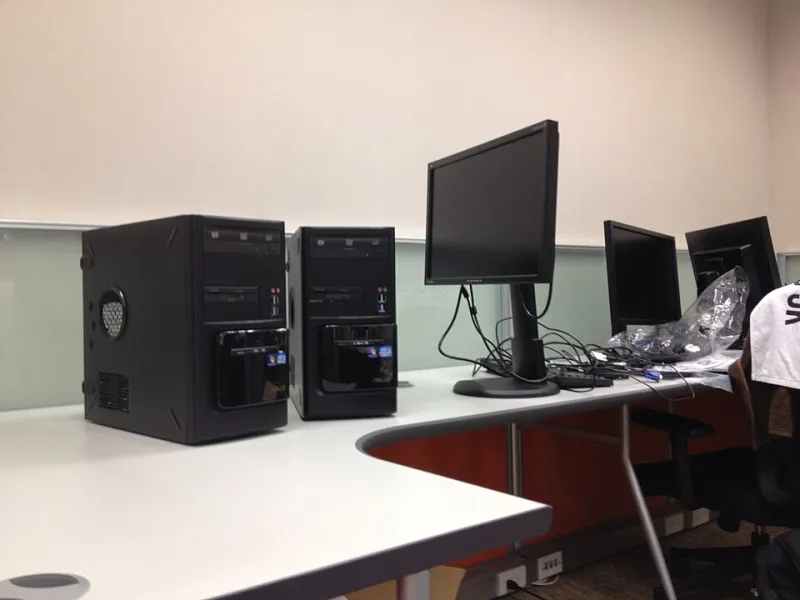
Photo: Oliver Propst, CC BY-SA 3.0, via Wikimedia Commons
There is a certain poetry to a grey Dell OptiPlex from a office clearance sitting under a gaming desk. It has the aesthetic appeal of a filing cabinet and the upgrade path of a locked-down work laptop, yet every few months someone on a UK forum asks whether a £180 ex-corporate refurb can become a 1080p gaming PC. The honest answer is yes — sometimes. The less honest answer is yes, and then you discover the power supply has a proprietary 12-pin connector and your GPU plans evaporate.
This is the practical version: which ex-office machines are worth targeting in the UK, what they can realistically play, and where the value falls off a cliff.
Why the ex-office pile is tempting
Corporate IT departments lease in bulk and dump in bulk. That means UK sellers — CeX, eBay business sellers, local IT asset disposal firms, and the odd pallet-load clearance — end up with stacks of 8th to 10th-gen Intel machines. A typical £150–£220 unit gets you an i5, 8GB or 16GB of DDR4, a small SSD, a legitimate Windows licence, and a case that has spent its life in a temperature-controlled office rather than a student flat.
For a first PC, that is a lot of working computer for the money. The catch is that corporate machines were designed to run Excel and a browser, not a 75W graphics card. The motherboard, PSU and chassis are often built around exactly the parts they shipped with. Upgrading is possible, but you need to know which walls you are going to hit before you hand over the cash.
Chassis families worth a look
The sweet spot is small-form-factor (SFF) desktops from the big three, not the tiny ultra-small-form-factor (USFF) boxes. USFF units are lovely little things, but they usually have no PCIe slot worth using and a power brick that caps you at integrated graphics. Avoid them for gaming unless you are building a emulation box.
Good families to search for include the Dell OptiPlex 7060 SFF, HP EliteDesk 800 G4 SFF, and Lenovo ThinkCentre M720s. These take a low-profile GPU, have room for a 2.5-inch SSD, and use standard DDR4 SODIMM or DIMM memory depending on the model. Tower versions — OptiPlex 7060 MT, EliteDesk 800 G4 TWR, ThinkCentre M720t — are bulkier but often give you a standard ATX power supply and more GPU clearance, which makes them far less annoying to upgrade.
Check the exact model number, not just the family name. Dell in particular has a habit of shipping the same badge with wildly different internals.
The three traps: power, boards, and the half-height slot
The first trap is the power supply. Many SFF office PCs use a proprietary PSU with a non-standard motherboard connector. You cannot simply swap in a Corsair unit when you want more headroom. Some HP and Dell units also use 12V-only rails with very little spare capacity. If the machine ships with a 180W PSU, assume you have about 75W for a GPU and not much else.
The second trap is the motherboard. BIOS support for graphics cards can be patchy, particularly on older HP EliteDesk models. Some boards refuse to boot with certain GPUs or limit the PCIe slot to a lower generation. You can usually find reports online for a specific model, but it is worth checking before you buy rather than after.
The third trap is physical. SFF cases take low-profile cards only, and many need a single-slot cooler. That rules out most modern gaming GPUs. The realistic options are a low-profile GTX 1650, a low-profile RX 6400, or — if you can find one at a sane price — a low-profile RTX 3050 6GB. These are not cheap for what they are, and the second-hand market for them is thinner than for full-height cards.
What 1080p actually looks like
A refurb with an 8th or 9th-gen i5, 16GB of RAM and a low-profile GTX 1650 will play esports titles happily at 1080p. Think Valorant, CS2, Rocket League, Fortnite on medium settings. Heavier modern games will run, but you will be turning settings down and accepting 40–60fps in busy scenes. An RTX 3050 6GB low-profile card pushes things further, but it costs nearly as much as the base machine.
Do not expect 1440p. Do not expect ray tracing. Do not expect a quiet experience either — office PCs are tuned for a spreadsheet, not a three-hour gaming session, and the single case fan will let you know about it.
The upgrade order that does not waste money
Start with the SSD. Many refurbs ship with a 256GB drive that is nearly full of Windows updates. A 1TB SATA SSD is cheap and makes the machine feel new.
Then RAM. 16GB is the practical floor for modern gaming. Check whether the machine uses full-size DIMMs or SODIMMs before ordering, and match the existing stick if you can.
Then the GPU. This is where you need to be honest about the PSU and the slot. A low-profile card without extra power connectors is the safe route. If you have a tower with a standard ATX PSU, you have more options, but check the PCIe power cables and the physical clearance.
Leave the CPU alone unless you find a cheap compatible chip. Office motherboards often have limited VRMs and no overclocking, and the gains are rarely worth the hassle.
When to walk away
A £180 refurb plus a £120 low-profile GPU, £40 of RAM and a £45 SSD lands you around £385. At that point you are in range of a used custom build with a full-size GPU and a standard PSU. The refurb only makes sense if you keep the total under about £300, or if you specifically want a small, quiet-ish box for esports and office work.
Walk away if the seller cannot confirm the model number, if the PSU is non-standard and you want a full-height GPU, or if the case is a USFF with no PCIe slot. Also walk away from any listing that calls a ten-year-old Xeon workstation a “gaming PC” without showing the GPU.
The ex-office refurb is not a shortcut to a high-end rig. It is a cheap, capable 1080p machine for someone who enjoys the puzzle — and who checks the power connector before falling in love with a graphics card.